
Ad Specs and Guidelines
Standard Print Magazine Sizes
American Fruit Grower, Western Fruit Grower, American Vegetable Grower, Greenhouse Grower, CropLife, CEAg World, Cotton Grower (October issue only – scroll for tabloid sizes)

Full Page: 8″ x 10.75″
Add .125″ bleed on all four sides

2 Page Spread: 16″ x 10.75″
Add .125″ bleed on all four sides

2/3 Page: 4.5″ x 10″

1/2 Page H: 6.875″ x 4.875″

1/2 Page Island: 4.5″ x 7.5″

1/2 Page V: 3.5″ x 10″

1/4 Square: 4.5″ x 3.75″

1/4 Page V: 2.125″ x 7.5″

1/6 Page H: 4.5″ x 2.375″

1/6 Page V: 2.125″ x 4.875″

1/3 Page Odd: 3.5″ x 4.875″

1/3 Square: 4.5″ x 4.875″

1/3 Page V: 2.125″ x 10″
CropLife IRON Print Sizes

2 Page Spread: 21.5″ x 13.75″
Add .125″ bleed on all four sides

Full Page: 10.75″ x 13.75″
Add .125″ bleed on all four sides

1/2 Page H: 9.875″ x 6.75″

Junior Page: 7″ x 10″

1/6 Page: 3.5″ x 6.75″

1/3 Page: 6.25″ x 6.75″

1/4 Page: 4.875″ x 6.75″

2/3 Page: 6.25″ x 13.5″
Cotton Grower Tabloid Print Sizes (October Issue Only)

Full Page: 10.875″ x 15″
Add .125″ bleed on all four sides

1/2 Page H: 9.875″ x 6.75″

1/3 Page Square: 6.25″ x 6.75″

1/3 Page V: 3.125″ x 13.5″
AgriBusiness Global Print Sizes

Full Page: 8″ x 10.75″
Add .125″ bleed on all four sides

1/2 Page H: 6.875″ x 4.875″

1/3 Page: 4.5″ x 4.875″

1/4 Page: 3.5″ x 4.875″
Preferred Document Format
Adobe Acrobat PDF
Click the icon below to download the Meister Media PDF presets

Click the icon below to download the Meister Media PDF Job Options File

Acceptable Document Formats / Applications
Adobe InDesign CC
QuarkXPress
Adobe Photoshop
Adobe Illustrator
Graphic Requirements
All graphics must be high resolution (300 dpi or above at 100%) EPS, TIFF, PICT, JPEG-Hi-res files, also must include original (native) files. We are unable to accept: JPEG (below 300 ppi), GIF, Word Metafile or any internet graphics for print.
We cannot output color files created with RGB – all color files must be created using CMYK.
Fonts
Only postscript and open type fonts accepted. True Type will not be accepted.
Must include both printer and screen fonts with native ad files.
Fonts in ad files created on a PC will be substituted with the closest matching OpenType font.
Due to legal restrictions, customer supplied fonts cannot be kept on file by Meister Media Worldwide, therefore fonts must be supplied with each new file submitted.
Submissions
Submit your electronic ad using the following disk / media type:
FTP (click here)
CD-ROM
We reserve the right to refuse ads submitted via e-mail.
Printing Process and Binding Method
Printed using 150 line screen to SWOP standards/saddle stitched.
Printing Specifications
Acceptable Materials: Electronic files are preferred. Final reproduction quality is contingent upon sharpness of materials furnished. All advertising composition costs will be charged at the publisher’s cost. All 4/C materials should meet SWOP® standards. Materials will be held for one year from last insertion.
Insert Specifications
Inserts stitched into publication (contact the publisher for pricing):
2 pages stitched in – 12-1/2″ x 11″ (Including 4″ binding flap – no type)
4 pages stitched in – 16-5/8″ x 11″ (Including additional 3/8″ on high folio side for automatic binding lip)
Inserts tipped on to publication (contact the publisher for pricing):
2 pages tipped on – 8-1/8″ x 11″
4 pages tipped on – 16-1/4″ x 11″
1/8″ head (trim and bleed); 1/8″ foot (trim and bleed)
Contact Phyllis Simcich (info below) for insert shipping instructions.
Proofs
Proofs are required for all electronic ad files submitted. (Meister Media Worldwide cannot be held responsible for the content and/or output of customer supplied files if a proof is not supplied). In the event no color proof is supplied by the customer, Meister Media Worldwide may be required to provide a suitable color proof to the printer at the customer’s expense.

Medium Rectangle
Web & eNews
300 × 250 px
JPG, PNG, GIF, or HTML5
100 KB maximum
Click-through URL required
Impression and click tracking accepted
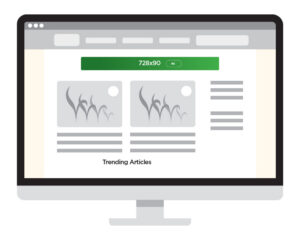
Leaderboard
Web only
728 × 90 px
JPG, PNG, GIF, or HTML5
100 KB maximum
Click-through URL required
Impression and click tracking accepted
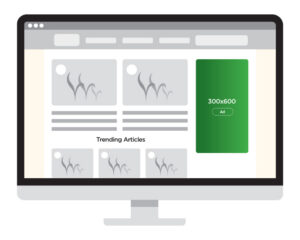
Half Page
Web only
300 × 600 px
JPG, PNG, GIF, or HTML5
100 KB maximum
Click-through URL required
Impression and
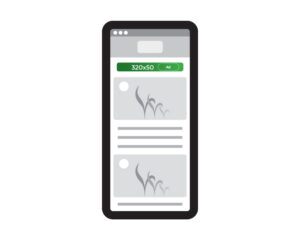
Mobile Leaderboard
Web only
320 × 50 px
JPG, PNG, GIF, or HTML5
100 KB maximum
Click-through URL required
Impression and click tracking accepted
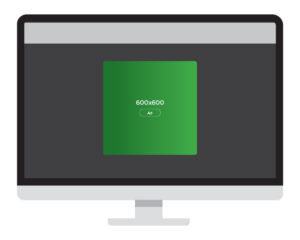
Interstitial
Web only
300 × 250, 336 × 280, or 320 × 480 px
JPG, PNG, GIF, or HTML5
100 KB maximum
Click-through URL required
Impression and click tracking accepted
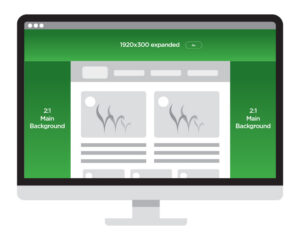
Billboard Skin
Web only
Desktop: 1920 × 300 px expanded; 1920 × 150 px collapsed
Mobile: 390 × 209 px expanded; 390 × 80 px collapsed
Background: 2:1 aspect ratio
JPEG, JPG, or PNG
500 KB maximum per image
Click-through URL required
Impression and click tracking accepted
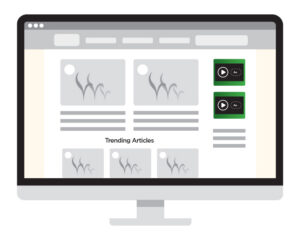
Medium Rectangle IBV
Web only
300 × 250 px
Background: JPG or PNG; 500 KB maximum
Video: MP4; 30 seconds; 200 MB maximum
Fallback: 300 × 250 px; JPG or PNG; 500 KB maximum
Click-through URL required
Impression and click tracking accepted

In-Banner Video Leaderboard
Web only
970 × 250 px
Background: JPG or PNG; 500 KB maximum
Video: MP4; 30 seconds; 200 MB
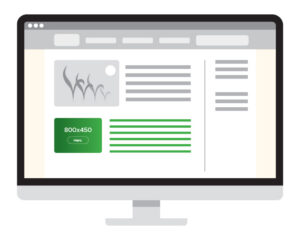
Native
Web & eNews
Sponsored article:
1200 × 675 px lead image preferred
300 × 300 px sponsor logo
Article copy supplied as a Word document
Up to 3 captioned 16:9 images
Promotion:
80-character headline; 300-character body copy
300 × 250, 728 × 90, and 320 × 50 px website ads
JPG, PNG, GIF, or HTML5; 100 KB maximum
Click-through URL required
Impression and click tracking accepted
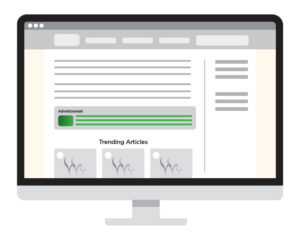
Short Form Native
Web & eNews
140 × 80 px image
Static JPEG
50-character headline
235-character body copy
Click-through URL required
Click tracking accepted
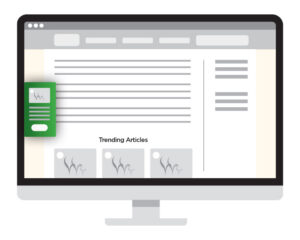
Contextual Toaster
Web only
200 × 100 px image
Static JPEG
30-character headline
150-character body copy
Call-to-action text required
Click-through URL required
Click tracking accepted

Contextual Slide Up
Web only
200 × 100 px image
Static JPEG
30-character headline
150-character body copy
Call-to-action text required
Click-through URL required
Click tracking accepted

Programmatic Standard Display
Web only
Accepted sizes:
300 × 250, 320 × 50, 300 × 50, and 728 × 90 px
300 × 600, 970 × 250, 970 × 90, and 160 × 600 px
JPG, PNG, GIF, or HTML5
100 KB maximum
Click-through URL required
Impression and click tracking accepted

Programmatic Native
Web only
Images:
1200 × 627 px main image
300 × 300 px logo
JPG or PNG; 100 KB maximum per image
Copy:
25-character headline
140-character body copy
25-character call to action
25-character sponsored-by name
Landing-page URL required
Impression and click tracking accepted
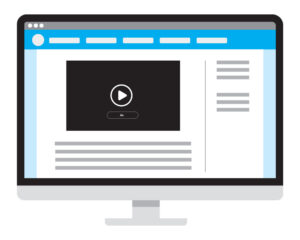
Programmatic Video
Web only
16:9 video
MP4, FLV, or WebM
30 seconds; 100 MB maximum
24–25 or 29–30 FPS
VAST 2.0 or 3.0 and VPAID accepted
Impression and click tracking accepted
Click-through URL required
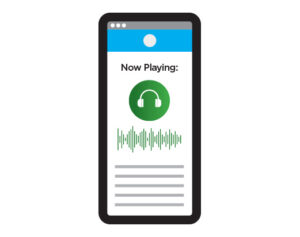
Programmatic Audio
Web only
30-second MP3
5 MB maximum
128 kbps; 44,100 Hz; normalized to -4 dB
Audio Verification URL required
VAST 2.0 accepted with an OGG audio asset
VAST URL must point to a valid XML file
Digital Ad Formats
Static Ads
JPEG, GIF, or PNG
100 KB maximum at 72 dpi
Single absolute click-through URL required
Animated GIFs
Available for websites and eNewsletters
100 KB maximum
Up to 10 seconds per loop
Multiple loops permitted, up to 30 seconds total
Single absolute click-through URL required
Some email platforms display only the first frame. The first frame must communicate the ad’s primary message.
HTML5 Ads
Available for website Leaderboard, Medium Rectangle, and Half Page ads
75 KB maximum initial file weight
200 KB maximum total file weight
Supply as a ZIP folder containing the HTML file and all referenced code, libraries, and assets
The uncompressed ad must work without a network connection
View the complete HTML5 guidelines
Native Ad Specifications
Sponsored Article
300 × 300 px sponsor logo
1200 × 675 px lead image preferred
16:9 ratio with no text on the lead image
Article copy supplied as a Word document
Up to 3 captioned 16:9 images
eNewsletter Promotion
80-character headline
300-character body copy
Landing Page Ads
300 × 250, 728 × 90, and 320 × 50 px
JPG, PNG, or GIF
100 KB maximum
Click-through URL required
Impression and click tracking accepted
Topical eNewsletter
- One medium rectangle ad (300 pixels wide x 250 pixels high) File type: jpeg or gif
- Two sponsored content ads.
Each sponsored content ad features
- One picture (800pixels wide x 450 pixels high) File type: jpeg or gif
- One headline + 400 characters/ with spaces
- Please provide a linking URL for each content
Contextual
Contextual ads target a key audiences messaging alongside relative associated content:
Image – 200 px x 100 px
Headline (maximum of 30 characters including spaces)
Text – up to 150 characters of text, which includes spaces
CTA – A few words for call to action 5 Keywords
5-10 Keywords to target
Advertiser-Supplied Content
Meister Media print and digital titles accommodate advertiser-controlled content (“sponsor content”) as a source of potentially valuable information to our audiences. To distinguish supplied content from Meister’s editorial content as an important service to our audiences, we have established these guidelines. All submissions are subject to a case-by-case review by Meister sales, content and design staff.
Print
Advertiser-controlled content (sometimes called “advertorial”) — whether supplied or produced by Meister custom services — must carry these elements:
(1) The word “Advertisement” at the top of each page, centered, in a font size no smaller than the body text of the Meister title — usually 9.5-10 pt.
(2) Headline font that is different than that of the Meister title. This is potentially subject to review by Meister’s content and design staff.
(3) Body text that is different than that of the of the Meister title, preferably in a sans serif font.
(4) Design elements — e.g., tabheads, sidebars and footnotes — that do not mimic or replicate those of the carrying Meister title(s).
(5) If custom-produced by Meister or a Meister title, advertiser-controlled content can carry such recognition in text (but not Meister logo) no larger than the body text of the Meister title — usually 9.5-10 pt.
eNewsletters
The label “Sponsor Content” is used to distinguish advertiser-supplied content from Meister editorial content.
Web
Meister accommodates sponsor-supplied content on its websites through our content management system. As with print, advertiser-controlled content is distinguished from Meister editorial content using these guidelines:
(1) The words “SPONSOR CONTENT” (line one) and “Presented by [Advertiser]” (line two) appear at the top of the Meister title web page containing advertiser-controlled content, and in any boxes in the editorial “rail” of a Meister site home page.
(2) The label “[SPONSOR CONTENT]” immediate precedes the headline in video.
(3) The label “[SPONSOR CONTENT]” immediately precedes the headline in search results and “related” article listings.
Webinars
Announcements, promotions and advertisements for advertiser-controlled webinars contain these elements:
(1) “Presented by [Advertiser]” appears at the top.
(2) The text “Sent to you by [Meister or Meister brand]” or “Hosted by [Meister or Meister brand]” appears at the bottom.
Sponsored Editorial Content
Meister welcomes sponsorship support of editorial-controlled reports and events that provide affinity benefits to the sponsor. In print, digital and face-to-face, recognition of such sponsorship support contains these elements:
(1) “Special Report [or Event] from [Meister title]”.
(2) “Sponsored [or Brought to You] By [Sponsor]”.
Download the PDF file for visuals of these guidelines

Submissions
Submit your ad material here
For More Information Contact Us
440.942.2000 x133 or [email protected]